About Me
Facebook
Facebook
Linked In
Linked In
Twitter
Twitter
YouTube
YouTube
Google +
Google +

Tuesday, July 23, 2013

Hello World Sample using WID & WPS

Introduction:
This sample shows the basic steps of business process development with WebSphere® Integration Developer. The sample covers everything you need to develop, test and run a simple business process including:
                Creating business processes from scratch, implementing snippet activities, testing business processes in the integrated test environment, installing business processes to WebSphere Process Server.
 Overview:
            Here are we are going to develop.
  • A WSDL interface file
  • A BPEL file

WSDL interface

                The WSDL interface exposes the process' functionality, enabling clients to interact with the business process. It contains an operation and describes the in/output for that operation. In this sample, we are going to develop a simple WSDL file with single operation using WebSphere® Integration Developer.

BPEL process

                The BPEL file describes the control flow and the activities that make up the business process. Furthermore, it defines variables that hold the data used throughout the business process and so-called "partner links" that represent entities such as process clients and other services with which the BPEL process interacts.
                We can develop the process two ways, micro flow and long running Process. If the process is a micro flow; this means that all activities in the process are executed in single transaction. The process is transient, no database interaction or messaging system is involved in the execution of this process. Only the process template is stored in the Process Choreographer database and read once before a process instance is started. If the process is a Long running, this means that all activities in the process can executed in multiple transaction. The process is non-transient, database interaction or messaging system is involved in the execution of this process.
                In this sample we are going to develop micro flow as because it has single transaction. Here the process will take request, append with hello and it will produce the response.
Implementation:
To implement hello world sample, follow these steps:
  • Create a new module.
  • Create an Interface.
  • Create the business process (BPEL).
  • Implement the Business Process (BPEL).
  • Assemble the SCA module.

Create a new module

To create the Hello World module, complete the following steps:
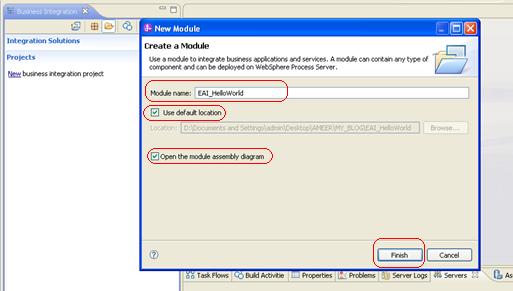
  1. In the Business Integration view, Right click on Projects and select New > Module.
  1. Give module Name as “EAI_HelloWorld” select ‘Use default location’ and ‘Open the module assembly diagram’ then click on finish.
Create an Interface

                Right click on Interfaces under “EAI_HelloWorld”, select New à Interface.

Give the name as “HelloWorldInterface” then click on finish.

Click on ‘Add Request and Response Operation’ in Interface editor. 
Give Operation Name as “helloWorld”, Inputs as “Request” type “String” and Outputs as “Response” type “String” then save.
Create the Business Process (BPEL)
Right click on Integration Logic under “EAI_HelloWorld”, select New àBusiness Process.
      Give name as “BP_HelloWorld” then click on next.
Select microFlow, and then click on next.
Select and Interface radio button, browse the ‘HelloWorldInterface’ Interface, select ‘helloWorld’ operation name and then click on finish.
So now our initial Business process is look like below.

Implement the Business Process (BPEL)

                Now we are going to implement our logic here for produce response as request along with Hello.
Drag and drop the snippet activity and rename it as ‘Logic’ from Basic Activities to pallet between Receive and Reply activity.
Now we need to write a java code for print request, response variables data and assign data to response variable.
                Select Logic snippet, go to properties à Details, select Java radio button and write the code as shown below.
Assembly the SCA Module
Now we need to assembly our SCA module.
Double click on Assembly Diagram under ‘EAI_HelloWorld’. It will open our Assembly diagram Editor.
Drag and Drop BP_HelloWorld Business process from EAI_HelloWorld to our Assembly diagram.
Now we need export as a web Services for communicated our BPEL from any external services.
Right click on ‘BP_HelloWorld’ in assembly diagram select Generate Export à Web Service Binding.
Select SOAP1.1/HTTP using JAX-RPC and then click on finish.
Finally our HelloWorld application is built successfully. The Assembly diagram is look like below, save the application.

Testing:
          Before going to test our application we need to install into WPS.
Deploy using WID:
Click on Servers tab on below of WID. If WebSphere Process Server v7.0 is stopped, start by right click on WebSphere Process Server v7.0 and select Start.
Once the WebSphere Process Server started, Right click on server and select ‘Add or Remove Projects.’
Select ‘EAI_HelloWorld’ click on Add then it will move into Configured projects and then click on Finish.
So now it will be published into WebSphere Process Server.
So now we are ready to test our HelloWorld Application.
Double click on Assembly diagram, then Right click on ‘BP_HelloWorld’ select ’Test Component’.
Now Integrated Test client window will open, Give Request as Your name (Ameer Basha) then click on Continuebutton at left corner Green Button. Please look in to the following screen shot for conformation all components.
Now you select ‘WebSphere Process Sever V7.0’ as your deployment location then click on finish.
Give user name and Password as ‘admin’ then click on Ok.
Now you check for successfully completion of your test. The Response is ‘Hello Ameer Basha’ as shown below, and check the logs at Console view. Check the flow of BP_HelloWorld in Integrated Test Client for detail steps.
Conclusion:
          In this article we learnt how to implement wsdl and BPEL. This is the simple and basic for learning WebSphere Integration Developer and WebSphere Process Server. Here we learnt about short running process implementation and testing using WID. We will see more examples in coming articles.
Downloads:
File Name
Description
  Size
Download
HelloWorldSample.pdf
Hello World Sample Using WID & WPS
675 KB
EAI_HelloWorld.zip
Hello World Sample Code
11 KB


continue reading

Wednesday, July 10, 2013

IBM Integration Designer V8.0 Installation

Introduction:
          IBM Integration Designer is one of the BPM family tools which come along with Process Server. This installation information provides instructions for installing IBM® Integration Designer V8.0 and optional features. Here we are going to learn installation of IID v8.0 along with Process server test environment.
Overview:
Step 1:
Create a user ‘bpmadmin’ with ‘Db2pswd!’ as password as an administration. And login windows with “bpmadmin” user.
Step 2:

Right click on ‘Launchpad’ in IBM Integration Designer Installation folder and select Run as Administrator.
Step 3:
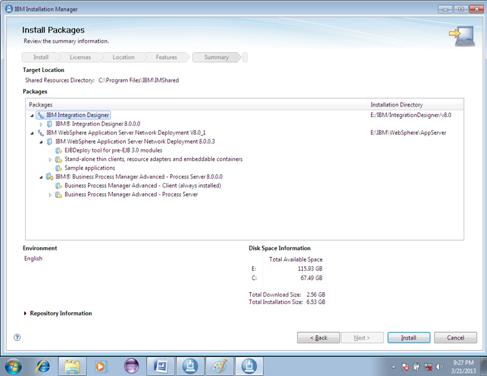
Now Installation window will open, Select IBM Integration Designer for IBM Business Process Manager Advance – Process Server, then click on Install Selected.
Step 4:
Now it will open for install packages. Select the packages that you need to install then click on Next.
Step 5:
Accept the terms and license agreement then click on next.
Step 6:
Select location of each package installation as shown in figure, and then click on next.
Step 7:
Select language as English, by default it selected as English, then click on next.
Step 8:
Select the features of IID and Process Server that you need to install then click on next.
Step 9:
Fill the configurations for the packages.
Profile Configuration
              User name: admin
              Password: admin
DB2 Credentials
             User name: bpmadmin
              Password: Db2pswd!
Then click on next.
Step 10:
Click on Install.
Step 11:
It will take around 4 hours for installation. Finally validate successful installation.
Downloads:
File Name
Description
      Size
Download
IID Installation.pdf
IBM Integration Designer V8.0 Installation
   370 KB

continue reading

Saturday, June 29, 2013

IBM WebSphere Process Server

WebSphere Process Server is a high-performance business engine to help form processes to meet business goals. It allows the deployment of standards-based business integration applications in a service-oriented architecture (SOA), which takes everyday business applications and breaks them down into individual business functions and processes, rendering them as services.
IBM® WebSphere® Process Server is a business process integration server that has evolved from proven business integration concepts, application server technologies, and the latest open standards. WebSphere Process Server is a high-performance business engine to help form processes to meet business goals.
WebSphere Process Server allows the deployment of standards-based business integration applications in a service-oriented architecture (SOA), which takes everyday business applications and breaks them down into individual business functions and processes, rendering them as services. Based on the robust Java EE infrastructure and associated platform services provided by WebSphere Application Server, WebSphere Process Server can help you meet current business integration challenges. This includes, but is not limited to, business process automation.
WebSphere Process Server enables the deployment of processes that span people, systems, applications, tasks, rules, and the interactions among them. It supports both long-running and short-running business processes, providing transaction rollback-like functionality for loosely coupled business processes.
WebSphere® Process Server is a service-oriented architecture (SOA) integration platform built on a uniform invocation programming model and a uniform data representation model. It provides a standards-based business process engine, using the full power of WebSphere Application Server.
The base runtime infrastructure for WebSphere Process Server is WebSphere Application Server. The Service Component Architecture and business objects that are part of the SOA core provide the uniform invocation and data-representation programming models. The SOA core includes the Common Event Infrastructure for generating events for the monitoring and management of applications running on WebSphere Process Server.
Supporting services provide the foundational business object and transformation framework for WebSphere Process Server. Service components represent the functional components required for composite applications.
The combination of a powerful foundation (WebSphere Application Server and the SOA Core) and service components in WebSphere Process Server allows quick development and deployment of sophisticated composite applications that run on WebSphere Process Server.

The WebSphere Process Server architecture is mainly defined by three layers that build the very basis for business applications:
Ø  Infrastructure layer
Ø  Runtime layer
Ø  Function layer
All of these layers depend on each other from the bottom up.
Infrastructure layer
The components in the Infrastructure layer provide the very basic functionality for all the above layers. One core function is the persistence of business and runtime data produced by messaging facilities and other components. Since the validity and integrity of this data is really crucial for WebSphere Process Server's role, an enterprise scale database is used for this purpose.
Furthermore, the Infrastructure layer provides a variety of messaging resources that are based on Web Sphere’s Service Integration Bus technology (also referred to as WebSphere Platform Messaging). On the one hand, these are heavily used by the SCA runtime for asynchronous communication and buffering. On the other hand, the resources are also leveraged by almost all components in the Function layer.
Runtime layer
This layer provides the basic service component functionality from a SCA point of view. It incorporates IBM's implementation of the SCA standard, which is called SCA runtime hereafter. This part of the layer provides the ability to run SCA modules and moreover enables the contained components to communicate with each other. An very important aspect concerning the communication is that the technical foundation is completely hidden by the SCA artifacts. Actually the SCA runtime is responsible for choosing the right communication channel and for doing the actual work. In this respect WebSphere Process Server heavily uses the underlying messaging capability, located in the Infrastructure layer.
Besides the additional functionality provided by the SCA runtime, WebSphere Process Server also includes core WebSphere Application Server capabilities. The application server enables the use of technologies like JMS (including MQ JMS connectivity), Web Services, J2EE Container services, JDBC database access and so forth. These are finally used by the SCA runtime to provide different kinds of binding types, such as Web Services Binding EJB Binding, to developers.
In summary, the Runtime layer builds the core of WebSphere Process Server's function as an execution platform for applications which are implemented according to the SCA assembly model.
Function layer
As described in the previous sections, the Infrastructure and the Runtime layer provide core services for running SCA applications. In addition to the actual implementation of the SCA assembly model, WebSphere Process Server features several SCA component implementation types (such as BPEL or Java™), and also many complementary services, that make the integration developer's life much easier.
One of the major components in this layer is the Business Process Choreographer that can be considered the execution container for business processes and human tasks. Since SOA is a rather business-centric approach, many SCA modules tend to make use of the so called Business Process Execution Language (BPEL) to a certain extent and will therefore get in touch with Business Process Choreographer from an operational point of view.
Besides the BPEL component, WebSphere Process Server supports a number of additional components and services that are not directly part of the SCA standard, but however may be leveraged by integration developers. One of the more common ones are Selectors and Business Rules. These components have a certain influence on the overall operational perspective on a WebSphere Process Server environment, since they use the underlying messaging and persistence capabilities, and because they can be relied on by modules in the Business Application layer.
Finally, the Common Event Infrastructure (hereafter called CEI) is located in the Function layer. CEI can be considered as a framework for logging business events, auditing and/or monitoring the execution of SCA components (and even business processes). The framework tightly integrates into IBM's SCA implementation, so that CEI can be used to generate a large variety of events that can furthermore be distributed to a variety of targets. For instance, CEI events may be used by a BPEL developer to report execution statistics of SCA components to a monitoring console (consider IBM Tivoli Enterprise Portal). However, CEI is not directly related to the SCA standards itself, but it is highly inter operable with other IBM products, such as IBM WebSphere Business Monitor (see Business Activity Monitoring with WebSphere Business Monitor V6.1in the Resources section for more information), to enable Business Activity Monitoring (BAM) solutions..
Business Application layer
The actual SCA modules are closely connected to WebSphere Process Server's Function layer, since they make heavy use of all the capabilities, such as BPEL, human tasks, CEI events and so on, from a operational point of view (this complexity is actually hidden from the developer). All other layers are more or less hidden from the applications.
In summary, WebSphere Process Server's operational reference architecture can roughly be structured in three different layers, whereas the lowest provides basic infrastructure capabilities, such as persistence and messaging. The Runtime layer contains the actual runtime implementation of the SCA assembly model and enables WebSphere Process Server to be an execution platform for SCA modules. Finally, the Function layer exposes several SCA component implementations (such as BPEL, Java, Human Tasks) to be leveraged by business application developers.
This section gives an overview over the database architecture of WebSphere Process Server. The following picture shows a more logical view of the different databases used by WebSphere Process Server.

By default, WebSphere Process Server V6.1 installs all database objects into one single database. However, it is not required to place all database objects of the different data silos into different databases, so a common practice is to place the silos in separately manageable data silos for performance and scalability reasons.
·         The WPRCSDB silo contains configuration and cell wide data of WebSphere Process Server. For example data about some SCA components (Business Rules, Selectors, and Relationships) is stored here. Furthermore, the data silo contains the Failed Event data. Because Failed Event information is needed in some cases to restart failed SCA flows, the availability of this data is quite important. This database exists just once per WebSphere Process Server cell.
·         The MEDB silo is used by the Messaging Engines running in WebSphere Process Server messaging infrastructure (see the previous section for more details) to persist messaging data: transaction context, message payload and administrative information. Each (active) Messaging Engine needs its own Schema within this database.
·         The EVENT silo data silo contains the data of the Common Base Event Infrastructure. If the option to persist all event data is selected it will be placed here.
·         The BPEDB silo contains Business Process Choreographer data, amongst other things the template data of processes and human tasks, status information of long running processes, and so forth. This data silo can exist several times in a cell if more than one server or cluster is configured for running Business Processes and/or Human Tasks.
Each of the data silos mentioned corresponds to one or more so called Data Sources within the WebSphere Process Server cell. A Data Source provides the connection properties to the underlying database along with connection pooling mechanisms. It is quite important to understand that these settings affect how WebSphere Process Server is performing. A good example to illustrate this is the maximal number of connections to the BPEDB. This value limits the concurrency of long running business processes to that number, because each process needs to write data to the BPEDB data silo.
This article introduced architecture for WebSphere Process Server that you can use as a basis for all operational efforts around your WebSphere Process Server enabled SOA infrastructure. In addition, you have learned that WebSphere Process Server makes heavy use of messaging and persistence features and that the proper operation of these plays a significant role on the road to a successful service-oriented environment.
5.   Download
File Name
Description
      Size
Download Link
IBM WPS.Pdf
IBM WebSphere Process Server
    300 KB

continue reading

Designed By AMEER BASHA G